From Gift Factory (EAB01) to Coffee Factory (EAB02)
In the Robotime Community, the ROKR Dream Factory series has become one of the most talked-about advanced builds. From the festive Dream Gift Factory (EAB01) to the newly released Dream Coffee Factory (EAB02), these kits combine intricate mechanics, lighting systems, and dynamic motion into one immersive experience. 
As @valleyggoo pointed out, in the community discussion, several builders mentioned that although the kit looks amazing, the build itself can be quite challenging (Robotime Community, 2025) [1].
Based on real discussions and shared experiences from the community, this guide brings together the most important tips to help you avoid common pitfalls and actually enjoy the build. 

Why Are These Kits So Challenging?
Both models are essentially hybrid systems:
 Mechanical (gears, belts, transmission)
 Electrical (lights, motor, music module)
 High-Difficulty Parts (flexible structures, tricky installations)
 Aesthetic (painting, decoration)
 Which means:
A small mistake in one part can affect the entire system.
Community user @TheToday noted:
“Without sanding, some parts won’t even fit properly.” (Robotime Community, 2026) [2]

Core Rule #1: Smooth Mechanics Above All
1. Gears = Sanding + Waxing (Non-Negotiable)
This is the #1 cause of most issues.
- Sand every contact surface
- Apply wax wherever instructed
- Don’t worry about running out, it’s enough
@jeanneL put it perfectly:
“Wax, wax, wax! It’s essential!” (Robotime Community, 2025) [3]
If things still feel tight: Consider adding wood lubricant

2. Belts & Conveyors: Too Tight = System Failure
One of the most common issues across both kits.
- Typical symptom:
Everything jams right after installing the belt
@valleyggoo shared a key fix:
“Make sure the belt isn’t too tight, leave a bit of space.” (Robotime Community, 2026) [6]
Golden rule: Slightly loose > perfectly tight

3. Test Early, Test Often
A major mistake many builders make:
Only testing at the very end
Instead, test in stages:
- After gears → test
- After belts → test
- After wiring → test
Consensus: “Don’t wait until the end to test everything.” (Robotime Community, 2026) [9][8]

Electrical System: The Hidden Troublemaker
1. Follow Wiring Instructions Strictly
Common issues:
- Lights not working
- Wires getting caught in moving parts
@TheToday warns:
“The light wire is long and needs to go through a complex path, keep it tight.” [2]
Key tips:
- No slack
- Keep away from gears and rotating parts


A similar issue was reported by @Harley, who found that the conveyor belt kept catching due to a misrouted light string. After reviewing multiple YouTube build videos and essentially disassembling parts of the model, they discovered that the wiring path was incorrect and had to retrace several assembly steps. They also noted that two small cross boards above the conveyor belt may have contributed to the issue (Robotime Community, 2026) [7].
2. Check Connectors Carefully
Lights didn’t work → BEFORE find @CustomerService, please
- Push connectors firmly
- Double-check before moving on
(Robotime Community, 2026) [8]


High-Difficulty Parts to Watch
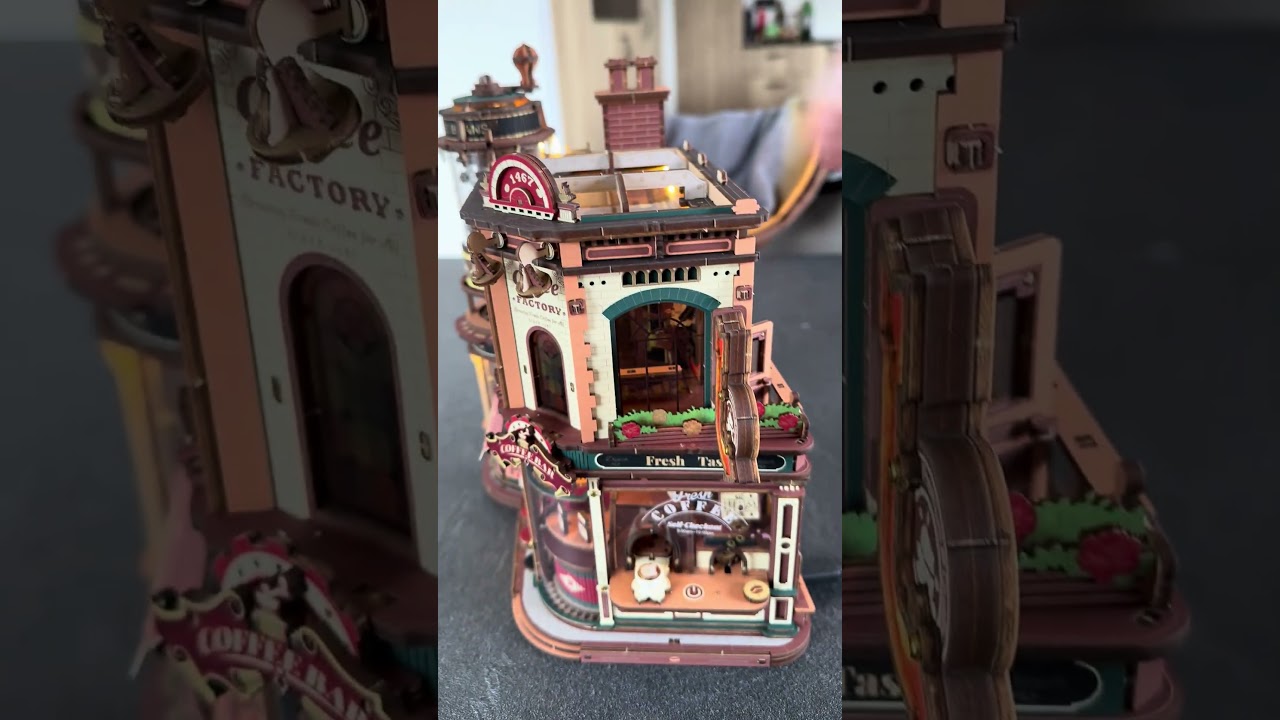
1. Q4 Plastic Part (Coffee Factory)
@Minus_88 highlighted this component as one of the most challenging steps in the Coffee Factory build.

Challenges:
- Needs bending during installation
- Must be fitted into a flexible / slightly unstable wooden structure
- Use tape from the back to hold it in place.
 Important warning:
- You only get one reliable installation attempt for Q4
- Removing and reapplying tape may damage the printed surface
2. Coffee Cups / Gift Boxes & Rotating Platform
If cups/boxes are loose:
The whole system can jam
 Make sure:
- Cups/boxes are firmly fixed
- Sand before painting plastic parts
3. Espresso Machine Module
- Requires painting on both sides
- Complex structure
Builders suggest:
Use a bit of glue if needed for stability
(Robotime Community, 2026) [11]
Customization: Where Things Get Fun
In the Robotime Community, many builders go beyond the original design.
 For example, @NoodleSalad transformed the Gift Factory into a BTS-themed version with albums and lightsticks (Robotime Community, 2026) [10].
Popular upgrades:
- Edge coloring
- Metallic detailing
- Full theme redesign


Just remember:
- Don’t interfere with moving parts
- Always test after modifications
 Good Habits Make All the Difference
 Don’t force parts
jeanneL:
“Never force pieces together—it’s easy to break something.” [9]
Double-check orientation
Wrong direction = rebuild
(Robotime Community, 2026) [2]
Prepare enough paint (DIY)
Real issue:
Running out of markers mid-build → color mismatch
(Robotime Community, 2026) [3]
Final Thought
The Dream Factory series isn’t just a model kit…
it’s a mini mechanical system.
You’re balancing:
- Precision
- Engineering
- Electronics
- Creativity
And when everything finally works…
the belts move, lights glow, music plays…


 References
[1] Robotime Community (2025) ROKR - Happiness: Christmas gift factory review (sort of).
[2] Robotime Community, TheToday (2026) Rokr Journey: Dream Gift Factory.
[3] Robotime Community, jeanneL (2025) ROKR Dream gift factory-getting stuck after i add belt.
[4] Robotime Community (2026) Rokr Journey: Dream Gift Factory update 1.
[5] Robotime Community, priiii (2025) ROKR Dream gift factory-getting stuck after i add belt.
[6] Robotime Community, valleyggoo (2026) Dream Gift Factory Completed.
[7] Robotime Community (2026) Dream Gift Factory Completed.
[8] Robotime Community (2026) Christmas Dream Gift Factory Light Issue.
[9] Robotime Community (2026) ROKR Journey: Dream Gift Factory complete!.
[10] Robotime Community, NoodleSalad (2026) Turning Dream Gift Factory K-Pop.
[11] Robotime Community, Kim (2026) Dream Coffee Factory Day 3: The Espresso Machine Fought Back


 They’re patiently waiting for me in my cupboard.